top of page


Step by step editing
The first thing I did was go onto google and find out the dimensions for an A4 document. Once I had this I typed it into Photoshop and coloured the page with the same colour as my digipak. I did this by selecting the pipette tool and clicking on my digipak, which selected the colour at the bottom of the screen and then allowed me to fill the A4 document. I then added the same picture from the digipak and resized it to fit the size of the document. Just like the digipak I then edited the picture to give it an old fashioned effect. I did this by reducing the opacity and adding an outer glow.

The next thing I did was add the same font text as the text from the digipak. The only thing different I did was change the font size from the digipak text. I also selected the text tool and added a quote I found from the Telegraph. I did this because when I looked at the codes and conventions, one convention was the use of quotes and reviews to increase the number of sales.
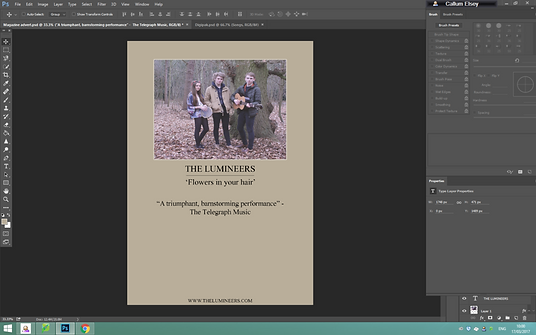
I then decided to add a couple of singles from 'The Lumineers' because this is something else I noticed when researching magazine adverts. I did this by selecting the text tool button and then drawing a rectangle around the text. I resized it by pressing CTRL +T and then removing the fill and making the line of the shape thicker.

In my research I noticed that a date for when the album is being released is put onto the magazine advert. Therefore, I decided to add some text with the date on. Just like the box around the singles that are also featured on the album, I added one around the date to make the date stand out more. I also added 'The Lumineers' website on the poster becausxe this is another thing I noticed when researching as well as adding social media icons to create a hype around the product.

The final thing I added to my advert was a rating because once again this was another major thing I saw in my research.

bottom of page